

Most buying guides tell you to choose the educational robotics kit with the most sensors, motors, and impressive demonstrations. That's backwards. A robot that performs a flashy task for an afternoon can become an expensive paperweight if its app disappears, its lessons don't match your curriculum, or its construction demands more adult help than your classroom can provide.
The right question isn't, “What can this robot do?” Ask, “What will this platform help a child learn consistently over time?” The strongest choice balances age-appropriate hardware, a clear progression in programming, reliable curriculum support, manageable supervision, and a software model you can live with.
| Platform type | Best starting point | Coding approach | Strongest use |
|---|---|---|---|
| Screen-free tactile robot | Early learners | Buttons, cards, or physical manipulatives | Sequencing and basic cause-and-effect |
| Visual block-coding kit | Elementary and middle school | Drag-and-drop blocks | Logic, iteration, sensors, and simple automation |
| Modular classroom platform | Middle school and structured programs | Block coding progressing to text coding | Project-based STEM and repeatable lessons |
| Advanced programmable kit | Older students | Python, C++, or another text-based language | Engineering design, debugging, and independent projects |
The Hidden Costs of Modern Robotics Platforms
Before comparing sensors and motors, audit the companion app, lesson library, and update policy as part of the purchase price. A kit can contain capable hardware and still deliver weak instruction if students spend lessons troubleshooting logins, pairing devices, or following scripts they cannot modify.
The software dependency deserves a practical audit, not a passing glance. Confirm whether programming, lesson access, firmware updates, or basic operation requires an app. Then check five points:
- Subscription exposure: Determine which lessons, projects, and teacher materials disappear when access ends.
- Device dependence: Identify the required tablet, operating system, browser, and minimum device specifications.
- Account management: Review student privacy settings, teacher permissions, data retention, and the process for removing former users.
- Abandonment risk: Ask whether the robot remains programmable if the company discontinues the app, stops updates, or closes the service.
- Training overhead: Budget time for teachers to learn both the robot and the platform that controls it.
These conditions belong in the total cost of ownership. A low purchase price can become poor value if a school must replace compatible devices, renew access, retrain staff, or abandon lessons after a platform change.
Practical rule: Treat the app, lesson library, and update policy as part of the product. They aren't optional extras.
Hardware should serve a learning sequence
A robot earns classroom time by supporting a progression from construction to prediction, programming, testing, and revision. The lesson sequence should make students alter variables, observe results, diagnose errors, and explain their decisions. Assembly followed by copied code offers activity, but it gives learners little intellectual ownership.
The 2026 review of 30 educational robotics kits found that 27 kits, or 90%, addressed most of 17 primary indicators across five technological-literacy competencies (International Journal of Technology and Design Education). The finding supports careful curriculum review, not automatic approval. The review also found that curriculum alignment was often broad rather than intentional.
A product may list engineering, coding, problem-solving, and digital literacy while offering no coherent route through those skills. Before buying, require lessons to name a target competency, present a meaningful challenge, and ask students to justify why their solution works. Reject platforms whose strongest evidence is a polished demonstration rather than learner reasoning.
Audit the platform before buying
Look for downloadable lessons, offline programming options, documented hardware, and accessible replacement parts. Test the workflow before purchase: create a teacher account, inspect a sample lesson, check update requirements, and determine what remains available without a subscription. Ask whether student work belongs to the learner, the school, or the platform provider.
Choose the kit that remains usable after the novelty fades, the curriculum changes, and the original adult who assembled it is no longer available to help.
How the Market Shifted from Hardware to Software
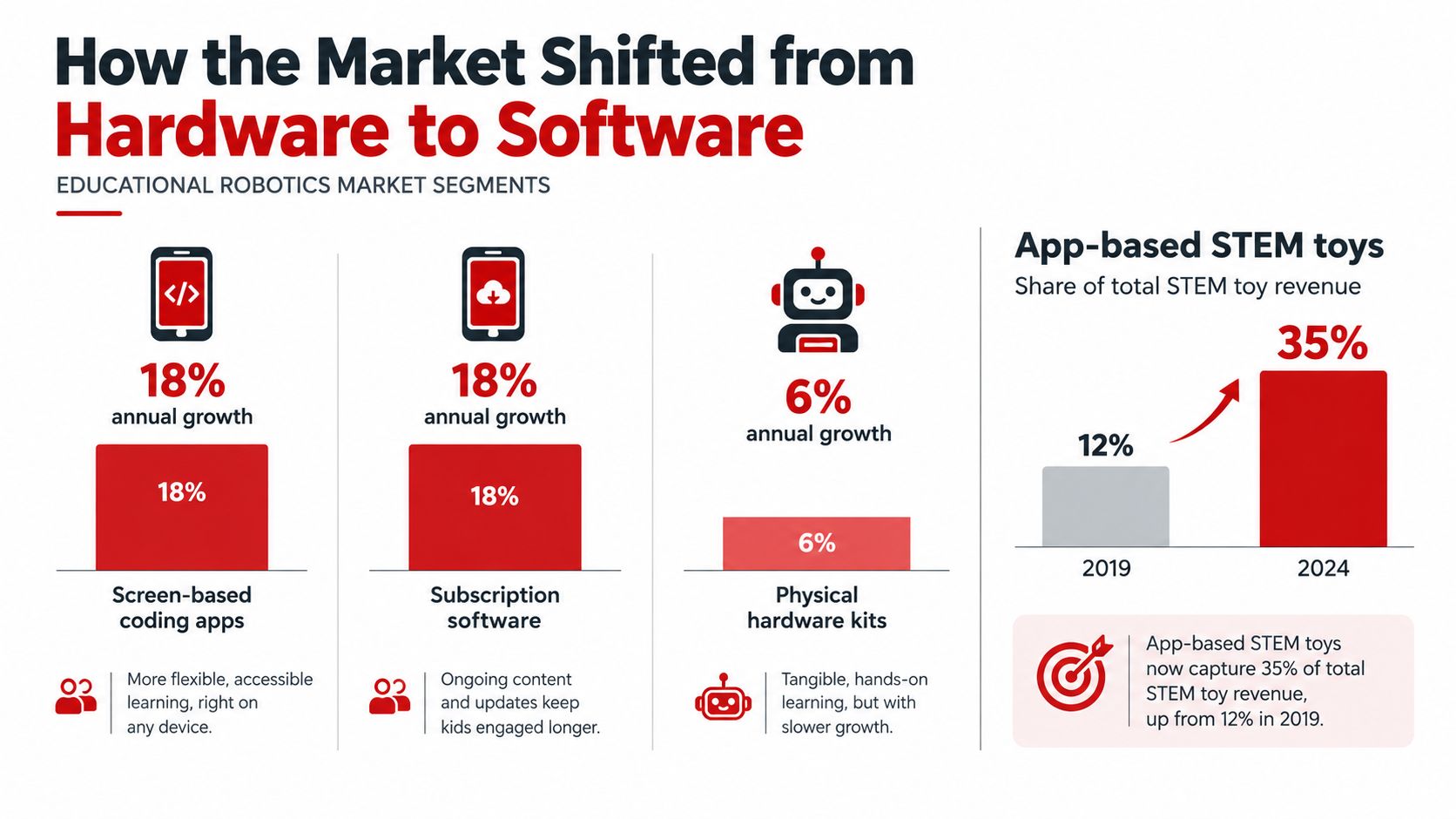
The robotics kit is no longer the whole product. The box gets a school or family started, while software, content updates, accounts, and support determine how long the platform keeps generating value. That business model changes what buyers should examine. Hardware specifications still matter, but recurring access costs and provider commitments can matter just as much.
One market estimate places the global STEM education and robotics market at USD 14.4 billion in 2025, with educational robotics kits representing about 50% of the market, or USD 7.20 billion in 2025. The estimate rises to USD 16.7 billion in 2026 and projects USD 63.0 billion by 2035, with a projected 15.9% CAGR from 2026 to 2035 (Next Move Strategy Consulting). These figures indicate strong demand. They do not show whether a particular provider offers fair pricing, stable access, or useful support.
Where the platform makes money
Manufacturing standardized motors, sensors, and controllers is easier than building a durable digital service. Providers can therefore compete through guided activities, teacher dashboards, cloud content, LMS integrations, and paid curriculum packages. Those features create continuing revenue after the initial hardware sale.
Industry analysis describes growth around AI-enabled tools, LMS integrations, cloud-linked content, and curriculum bundles, alongside a shift in margins from hardware toward software and subscriptions (Intel Market Research). Policy mandates, lower component prices, and the combination of robotics, coding, and AI also support that expansion.
For buyers, this creates a straightforward financial question: what will the platform cost to operate after the kit arrives? A low-cost box can become expensive if essential lessons, device access, storage, or account features require recurring payments. A higher upfront cost may be easier to justify when the provider documents ongoing access, replacement policies, and compatibility.
Questions that expose the business model
Before purchasing, ask:
- Can students program offline? Identify the devices, accounts, and internet access required if they cannot.
- What remains available without a subscription? Separate basic programming from premium activities and teacher tools.
- Who maintains the curriculum? Check for revision history, teacher documentation, and standards mapping.
- Can students preserve their work? Favor platforms that let learners export projects or retain access when accounts change.
- What happens after a device update? Require documented compatibility and a clear support process.
For classroom activities that connect programming with age-appropriate play, use this guide to teach coding to kids through practical activities. The purchase decision should account for the full service model, not just the parts in the box.
Matching Kits to Developmental Age Bands
Age labels help narrow a search, but they shouldn't make the decision by themselves. A child's fine-motor control, tolerance for frustration, reading ability, spatial reasoning, and access to adult support matter just as much.
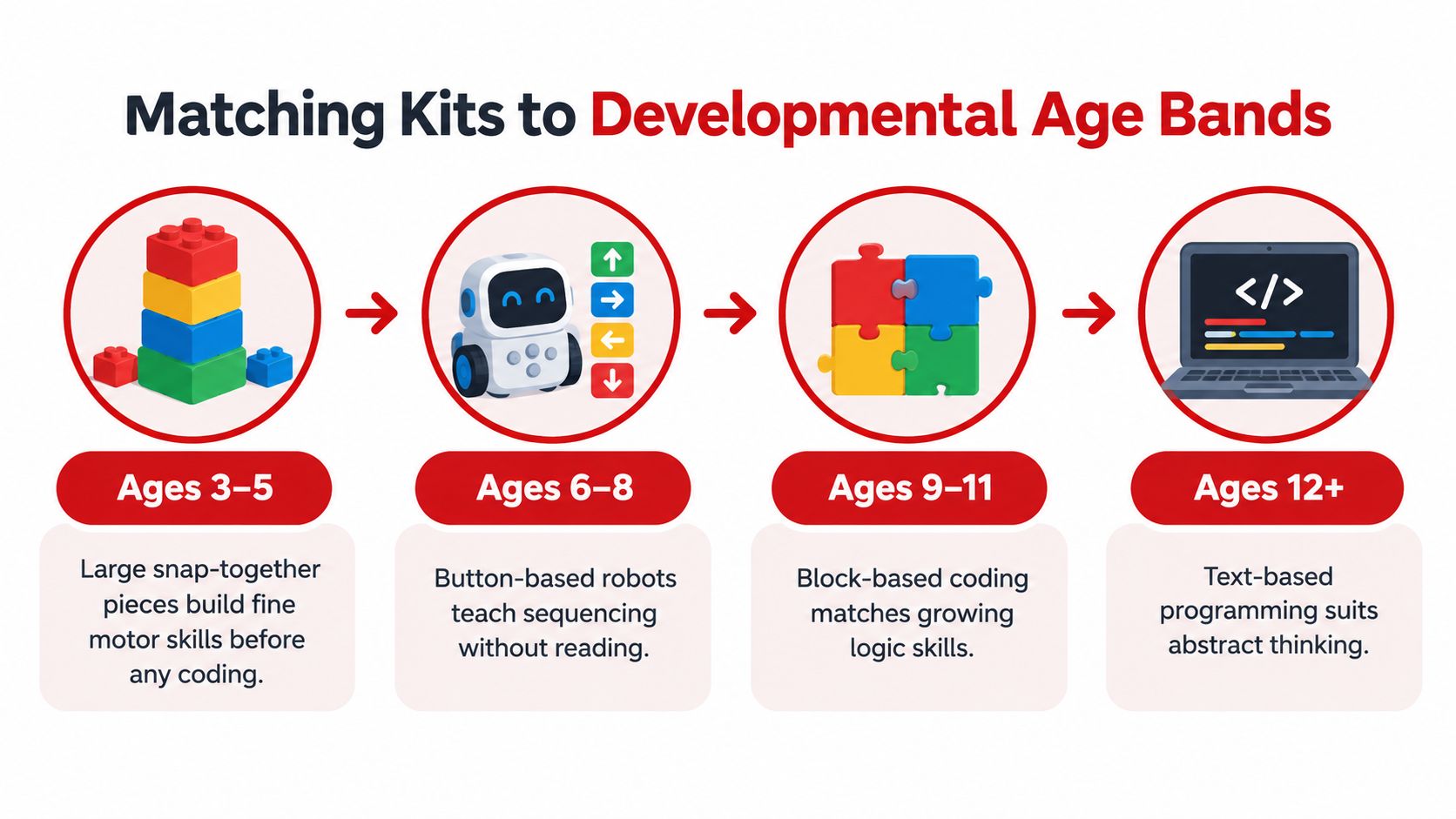
A useful progression moves from physical manipulation to visual sequencing, block-based programming, and eventually text-based code. One independent age guide maps screen-free tactile systems to ages 4–5, app-based visual block coding to ages 7–8, and text-based coding such as Python or C++ to ages 12+ (Bring on the Robots).
Ages 3 to 5
Start with large parts, tactile construction, and simple cause-and-effect. At this stage, children benefit from arranging physical pieces, following directional instructions, and noticing what changes when they alter the sequence. They don't need a complex app to begin thinking like programmers.
For families choosing a birthday or holiday activity, this guide to gifts for three to five year olds offers useful context around physical play and developmental fit. Select products that minimize small loose components, avoid fragile mechanisms, and invite open-ended building.
Ages 6 to 8
Button-based robots and physical coding cards can introduce sequencing without requiring fluent reading. Children can plan a route, predict the result, test it, and revise the instructions. That loop builds computational thinking while keeping the interface concrete.
Avoid buying an advanced app-based system just because a child can use a tablet. Device familiarity isn't the same as readiness for abstraction. A kit is appropriate when the child can understand the relationship between an instruction and an observable movement.
Ages 9 to 11
This is often the right stage for visual block coding, sensors, modular builds, and short design challenges. Students can begin to use conditions, loops, and variables while still seeing the structure of a program. They also need permission to build imperfectly and debug without an adult taking over.
A STEM building kit resource can help parents and teachers compare construction-focused activities before moving into a more software-dependent platform.
Ages 12 and older
Older learners can benefit from text-based programming, electronics, mechanical design, and open-ended engineering problems. Python or C++ can become meaningful when students already understand sequencing, iteration, and debugging through hands-on work.
For this group, evaluate documentation and extensibility. Can students modify the hardware? Can they use external sensors? Does the platform support a project that lasts beyond a guided lesson? Advanced learners need control, not merely more features.
Comparing Leading Classroom and Home Platforms
A classroom platform must survive repeated use, varied skill levels, and limited teacher attention. A home kit can tolerate more experimentation with one child and one adult. Those environments overlap, but they aren't identical.
A classroom-focused buying guide recommends treating the age printed on a product page as an initial shortlist rather than a final selection. Construction complexity, programming platform, and the level of teacher supervision required determine real suitability (Acerobotics).
| Platform type | Target age | Coding interface | Best use case |
|---|---|---|---|
| Screen-free directional robot | Ages 3–8, depending on design | Buttons, cards, or physical manipulatives | Early sequencing, routes, and collaborative play |
| LEGO SPIKE Prime style modular kit | Grades 3–8 | Block coding with a path toward text coding | Guided classroom projects and mechanical design |
| VEX IQ style platform | Elementary and middle school | Visual block coding and structured robotics tools | Team projects, sensors, and repeatable challenges |
| VEX V5 style platform | Older middle school and high school | Block coding with text-based options | Competition-grade builds and advanced iteration |
| App-dependent home robot | Varies by product | Companion app and visual programming | Short home activities when device access is reliable |
Construction determines supervision
A kit with complex gearing, tight tolerances, or ambiguous instructions can overwhelm younger learners even when the software is simple. Adults should inspect the build process before assigning independent work. If every lesson begins with an adult correcting assembly, the platform is consuming time that should belong to the learner.
The programming interface matters just as much. Drag-and-drop blocks make program structure visible, while text coding offers precision and transferability. Neither is universally superior. The right interface matches the learner's current abstraction skills and the lesson's objective.
Choose for your actual setting
For a home, prioritize quick setup, durable parts, clear instructions, and the ability to pause without losing progress. For a school, prioritize shared-device management, lesson consistency, spare parts, teacher training, and a workflow that works across multiple groups.
Teachers exploring age-appropriate activities can also review robotics for kids, then test a candidate platform through a small lesson before making a larger purchase. A pilot should measure setup time, student independence, quality of discussion, and whether learners can explain their code.
Designing Lessons That Drive Real Competency Gains
A robotics kit does not produce competency through construction or app access alone. The lesson must require students to predict an outcome, build for a purpose, program a solution, inspect evidence, and explain their decisions. Plan that sequence before selecting the platform.
Write one observable outcome before opening the box. Students might explain how a sensor input changes a motor response, compare two algorithms for the same route, or revise a mechanism after identifying a mechanical constraint. Avoid objectives such as “learn coding.” They give students and teachers no clear evidence to assess.
Structure the activity around a repeatable workflow:
- Predict: Students draw or describe what they expect the robot to do.
- Build: They assemble only the mechanism required for the challenge.
- Program: They create an initial solution instead of copying a finished model.
- Test: They record the result and identify where performance diverged from the prediction.
- Revise: They change one meaningful variable and justify that decision.
- Explain: They present the result with precise technical language.
The sequence turns debugging into evidence of reasoning. It also exposes whether a student understands the relationship between code, structure, sensors, and movement. A completed robot shows the final state. A documented iteration shows how the learner reached it.
Make the platform serve the workflow
Software should support repeated testing rather than distract students with setup, account management, or decorative features. Check whether learners can inspect their code, change one variable, save versions, and continue working when device access or platform services are limited. A modular build system helps only when the curriculum gives students a reason to modify it.
A comparative study reported that a VEX V5 cohort rose from about 48.0 to 68.2 on a STEM pre/post test, while a legacy-kit cohort rose from about 49.5 to 59.9. The reported gains were roughly +20.2 versus +10.4 points, with the between-group result significant at p<0.001 (American Journal of Educational Research). The finding supports deliberate use of modular hardware and iterative programming. It does not excuse weak lesson design or prove that newer equipment alone improves learning.
Use project-based learning lesson plans to find adaptable project structures, then map each activity to one competency and its evidence. Include repair, reuse, responsible disposal, and electronics lifecycles through e-waste educational resources for schools. Students should learn to evaluate the platform's long-term cost, not only celebrate the first successful build.
The Case for Screen-Free Early Childhood Robotics
Giving a young child a complex coding app doesn't create an early advantage by default. It can replace physical reasoning with tapping, introduce unnecessary frustration, and make the adult responsible for every technical obstacle.
A review of early-childhood robotics recommends simple robots with limited functionality and screen-free programming through buttons or physical manipulatives for pre-K through second grade learners (National Library of Medicine). The recommendation is developmentally sensible. Young children need to see, touch, move, and discuss the system before they need an advanced programming environment.
What screen-free play teaches
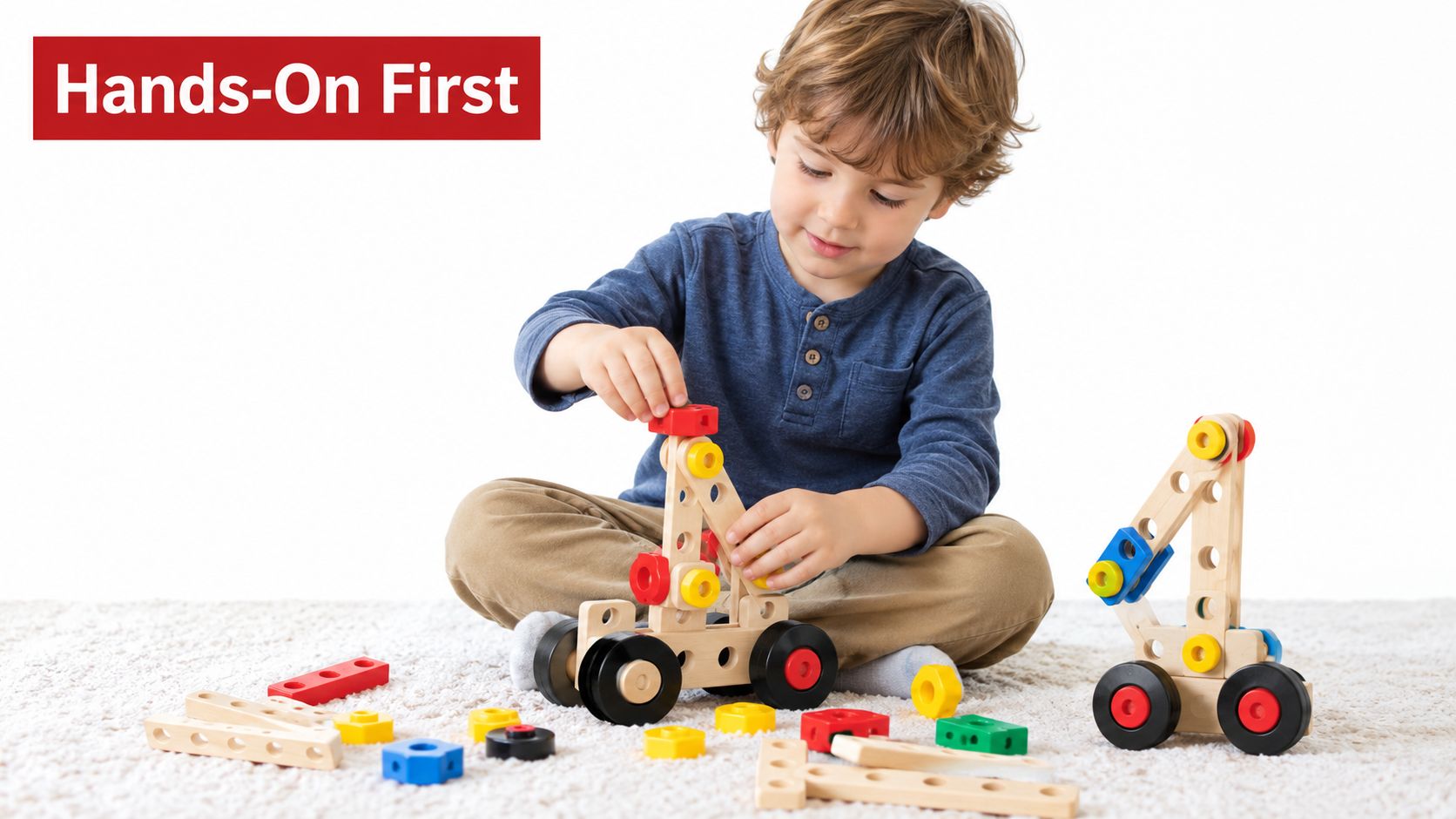
A child who places directional cards in a sequence is already working with order and prediction. When the robot stops at the wrong location, the child has a concrete problem to solve. The activity supports early computational thinking without demanding reading fluency, account creation, or device management.
Look for large manipulatives, clear feedback, simple movement, and open-ended challenges. A good early activity might ask a child to guide a robot around an obstacle, recreate a route, or change one instruction to reach a different destination.
The simplest interface often gives young learners the clearest ownership of the idea.
The adult's role should be to ask questions rather than seize control. “What did the robot do?” and “Which instruction should change?” lead to better thinking than silently fixing the sequence.
The video below can serve as a visual prompt for discussing hands-on construction and purposeful play.
When to add screens
Introduce visual coding when the child can explain a sequence, predict a result, and revise an error without treating the robot's behavior as mysterious. The screen should make the underlying logic clearer, not become the activity itself.
For pre-K and early elementary settings, resist the marketing pressure to buy the most technically advanced option. More advanced hardware isn't always more educational. A limited robot that supports independent reasoning can provide a stronger foundation than an app-heavy system that performs more tasks.
Verifying Safety Certifications and Platform Longevity
Safety review has two parts. First, verify the physical product. Second, determine whether the learning platform will remain usable after the initial purchase.
There isn't one certification designed specifically for classroom robots for young children. Consumer electronics in the United States and European Union commonly rely on general safety markings such as FCC or CE, so buyers should check the exact model rather than trust a brand-level statement (The Bot Scout).
Run a pre-purchase safety check
Use the product documentation, not only the marketplace listing.
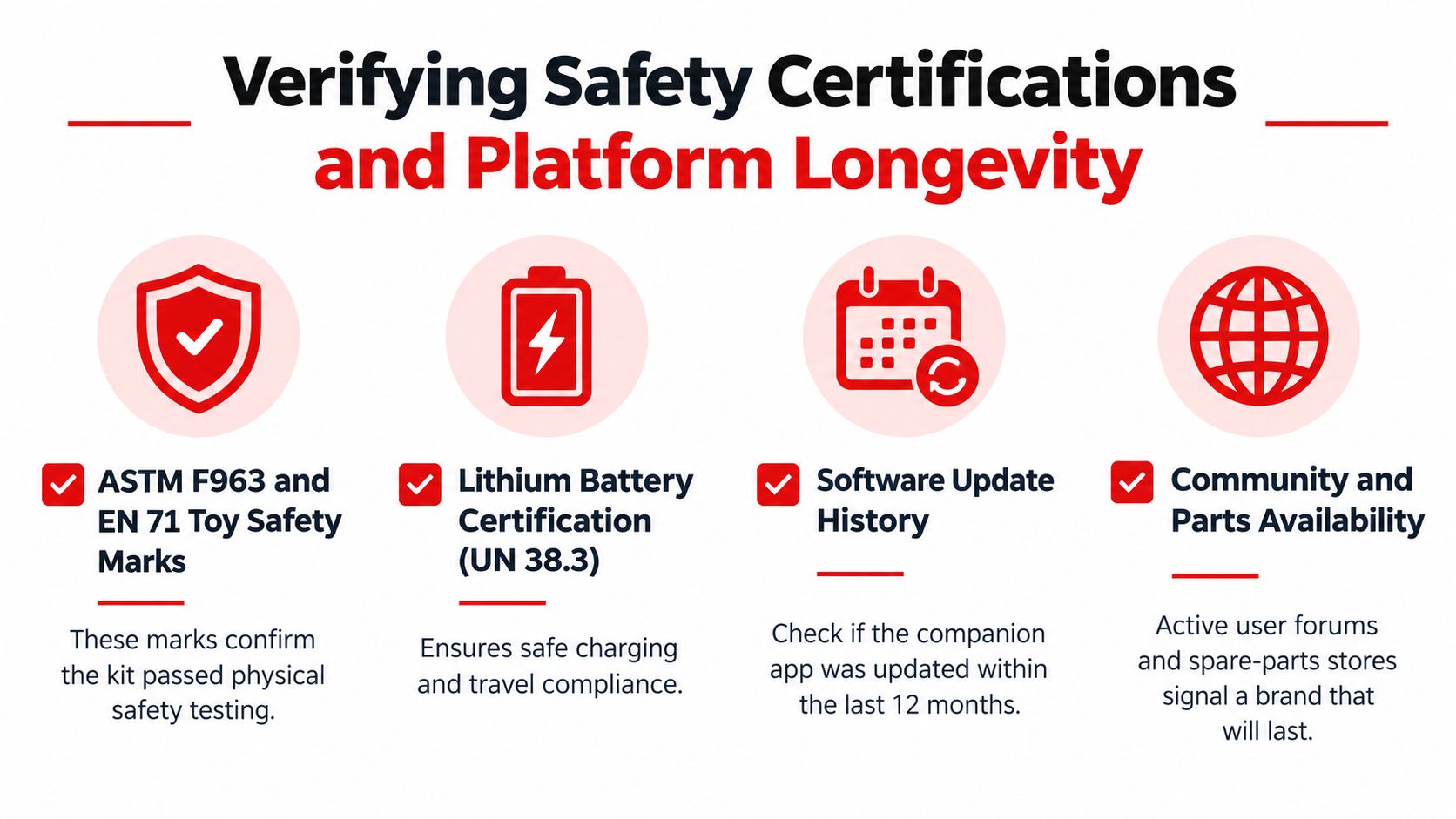
- Confirm the exact model. Check the model number on the packaging and verify the relevant FCC or CE information for that version.
- Read the small-parts labeling. A product's recommended age doesn't replace warnings about detachable components, magnets, batteries, or other hazards.
- Inspect battery guidance. Follow the manufacturer's charging, storage, and supervision instructions. For kits using lithium-ion batteries, review lithium-ion battery guidance before classroom deployment.
- Check the build itself. Look for sharp edges, exposed wiring, fragile connections, overheating during normal use, and parts that detach easily.
- Plan supervision. Young children may need direct help with construction and charging even when they can handle the learning challenge independently.
Test platform longevity
A durable kit should have more than a working robot. Look for a visible software update history, current documentation, active user discussions, replacement parts, and lessons that don't depend entirely on a cloud service.
Ask the manufacturer what happens if the companion app is retired. Find out whether projects can be exported, whether firmware can be updated without a paid plan, and whether the platform supports multiple operating systems. Schools should also ask how student data is stored and whether accounts are required for basic classroom use.
A practical buying test is to imagine the product without its marketing promise. If the app, subscription library, or online community vanished, would students still be able to build, program, test, and explain something meaningful? If the answer is no, you're not only buying hardware. You're accepting a long-term platform dependency.
Playz offers hands-on building, science, and engineering activities that support purposeful learning without making screen time the center of the experience. Visit Playz to explore tools that can complement a carefully sequenced STEM learning environment.